
Posting/editing the sandbox wiki was so easy! There was a time when I would have been completely confused and in the dark about posting. I have grown in leaps and bounds since the beginning of the semester!
Wikis are like a continuous, permanent discussion board. It could definitely be used in the classroom during student presentations, where, during, before, and after each performance, classmates could share their thoughts, opinions, and give constructive feedback.
Tuesday, April 20, 2010

Thing #15-Librarian 2.0
Come to us, please!!!??!?!?!?! I ,myself, wonder if so much technology will dominate and influence our patrons to the point to where no one needs our help. Many people like to say that nothing can compete with Mama’s homemade______, but because they live by their mother, they settle for store-bought instead. I hope that the “need of the library”-culture could be preserved and maintained. I’ve already heard talk of teachers being replaced by online learning. Could librarians every truly be replaced?
The Librarian 2.0 is kind of like the teacher who works hard to create a learner-centered environment. The librarian works hard to have the needs and desires of their diverse patrons met. Clarification and facilitation are to be the two key goals that drive the librarian into action! By addressing the needs of all of their students, the librarian must be sure that equity for all learners could be achieved.
The Librarian 2.0 is kind of like the teacher who works hard to create a learner-centered environment. The librarian works hard to have the needs and desires of their diverse patrons met. Clarification and facilitation are to be the two key goals that drive the librarian into action! By addressing the needs of all of their students, the librarian must be sure that equity for all learners could be achieved.
Thing #14-Technorati
A few weeks ago, before I even got to this post, I stumbled across Technorati; I was trying to find out Toshiba satellite laptop tricks.
I learned a little about my laptop from someone else’s review. Unfortunately, when I performed the keyword search for “school library learning 2.0”, in spite of trying the posts, tags, and directory, I did not find anything. When I looked up kettlebell, 34 blogs came up and no tags or posts popped up.
When I looked for popular blogs, I only found video blogs and tag words. I thought that more detailed information would have popped up, but it didn’t.
We use sticky notes to pinpoint important information. To me, any kind of tag is just fine, because it helps to lessen the amount of searches and time it takes to find information. It could also help someone to mentally and virtually organize information better. It could also help student understand how subtopics, topics, and categories are and how they could be organized. I could definitely see students using these types of websites to help them pinpoint or narrow down their research topics as they relate to teir projects/expereiments.
I learned a little about my laptop from someone else’s review. Unfortunately, when I performed the keyword search for “school library learning 2.0”, in spite of trying the posts, tags, and directory, I did not find anything. When I looked up kettlebell, 34 blogs came up and no tags or posts popped up.
When I looked for popular blogs, I only found video blogs and tag words. I thought that more detailed information would have popped up, but it didn’t.
We use sticky notes to pinpoint important information. To me, any kind of tag is just fine, because it helps to lessen the amount of searches and time it takes to find information. It could also help someone to mentally and virtually organize information better. It could also help student understand how subtopics, topics, and categories are and how they could be organized. I could definitely see students using these types of websites to help them pinpoint or narrow down their research topics as they relate to teir projects/expereiments.
Thing #13 Quien lo diigo? Who said it?
If I could create a class email account just for Delicious that everyone could log onto, it would serve as a wonderful way to do collective research, where everyone could create a large pool of information as each student tags more pages or specific areas (paragraphs/pictures) of interest.
I especially loved Furl aka Diigo. Every time I clicked on the Furl link, Diigo popped up. It is such a neat website; I think that it is the best one! The use of these bookmarking sites could encourage collaboration and help to improve one’s ability to research and communicate information. Librarians and teachers could even use these bookmarking sites to collaborate and work on large projects together. Librarians could make certain resources available to facilitate certain projects of teachers and/or students by making pools to pull from. Teachers could also set things up for student projects, where only certain resources could or would have to be pulled in order to perform specific tasks.
I especially loved Furl aka Diigo. Every time I clicked on the Furl link, Diigo popped up. It is such a neat website; I think that it is the best one! The use of these bookmarking sites could encourage collaboration and help to improve one’s ability to research and communicate information. Librarians and teachers could even use these bookmarking sites to collaborate and work on large projects together. Librarians could make certain resources available to facilitate certain projects of teachers and/or students by making pools to pull from. Teachers could also set things up for student projects, where only certain resources could or would have to be pulled in order to perform specific tasks.
Thing #12-Comments
Interact with comments: I think that this is very important because a blog is like an online, electronic, delayed conversation. Also, commenting back can assure the initial commentator that you felt that what they had to say was important, too.
Ask questions: What better way to provoke thinking and conversation? By asking question, you are pretty much telling or asking someone to share their thoughts.
This time around, when commenting on the blogs of others, I was more conscientious of what I was saying.
Whole Story is the blog to the Whole Foods Market. Not only is it may favorite place to shop because each location is cozy, fresh, and beautiful, but they also offer more natural, organic foods. I’m trying to get my family, especially our toddler, as healthy as possible. I commented on “OMG, Let’s Stop Eating GMOs”. More and more people are turning up with health issues and our children are physically developing more rapidly because of the growth enhancement agents (steroids and manmade fertilizers) that are used to produce our food.
KHOU-Weather is the weather blog from the Channel 11 News. I usually tune in to that station because trust their information. On “Houston weather forecast: Get ready for a soggy week!“ I commented about our weather for this week. What crazy weather!
Ask questions: What better way to provoke thinking and conversation? By asking question, you are pretty much telling or asking someone to share their thoughts.
This time around, when commenting on the blogs of others, I was more conscientious of what I was saying.
Whole Story is the blog to the Whole Foods Market. Not only is it may favorite place to shop because each location is cozy, fresh, and beautiful, but they also offer more natural, organic foods. I’m trying to get my family, especially our toddler, as healthy as possible. I commented on “OMG, Let’s Stop Eating GMOs”. More and more people are turning up with health issues and our children are physically developing more rapidly because of the growth enhancement agents (steroids and manmade fertilizers) that are used to produce our food.
KHOU-Weather is the weather blog from the Channel 11 News. I usually tune in to that station because trust their information. On “Houston weather forecast: Get ready for a soggy week!“ I commented about our weather for this week. What crazy weather!
Monday, April 19, 2010
Thing #11 Something kind of like shelfari
Where that Library Thing? This programs makes me think of what you could get if you cross shelfari with the barnes and nobles or amazon website! I love it becauset it's visually appealing and can be very helpful. I practiced by putting in some of my cookbooks. This program automatically put me in a group with everyone else who owns or has interest in the same group as my book. It also has available reviews from its readers, and it can also immediately link you to Amazon and other sites so that you could purchase your item online. Another cool thing that I really liked is the fact that if you activiate the local book search, Library Thing will automatically search the nearest stores for the desired book and even shows how many copies that the store has.
Since I put in my cookbooks, I was immediately placed in groups that owned or wanted the same copy of book that I had or I was put into groups where people love to cook. I could also choose groups to join. This is some sort of book-socializing website. This website could be easily used amongst students in a classroom, school, or grade level, or could even be used by faculty and/or staff; it's like an online book club. This could also sereve as a search engine just for books.
This is what one of my pages looks like; so far I've added 12 books!:
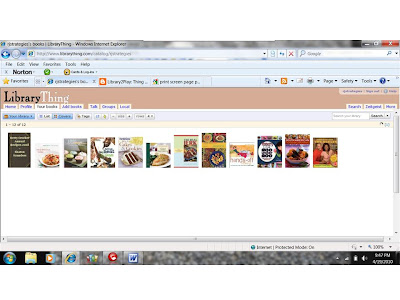
Since I put in my cookbooks, I was immediately placed in groups that owned or wanted the same copy of book that I had or I was put into groups where people love to cook. I could also choose groups to join. This is some sort of book-socializing website. This website could be easily used amongst students in a classroom, school, or grade level, or could even be used by faculty and/or staff; it's like an online book club. This could also sereve as a search engine just for books.
This is what one of my pages looks like; so far I've added 12 books!:

Monday, April 12, 2010
Thing #10-doing cool things with pic
Although all links or websites did not work correctly, some of the webpages connected me to others. For some reason, no matter where I clicked, I either ended up at Fototrix or on a website where the action either froze or kept "working". Using the suggested sites for photo manipulation was fun, easy, and free! First I had to either upload my photo from flickr or from my computer. After that, I could just click on the desired special effect and the program would generate the new integrated picture. In the classroom, it could these tools could be used to display the students of the month, special student assignments, and could also used to display student work or memoirs. These tools would also be great to use in the library in order to showcase books and the reviews of students. I got the the following picture from Silly Scenes. Look at how fototrix is on the actual photo...weird, huh? I just kept getting redirected to fototrix!?!?!
The Flower Symphony Lady on a Downtown Billboard:


The Flower Symphony Lady on a Downtown Billboard:


Sunday, April 11, 2010
Thing #9
I especially love the Edublogawards.com because it cuts straight to the top (concise), best blogs. Not only do these blogs work, but the earned their place on the site because of their reliability. I would put I like Technorati the most. The site is pretty, nicely put to together, organized in different ways.
I found Bloglines confusing because there weren't many subgroups in order to categorize everything. Therefore, when the results popped up, there were alot of blogs, but they weren't classified to make things easier for me. That made it appear cluttered to me.
I could definitely use Edublogawards.com and Technorati. They are full of feeds and blogs that I feel that I could trust, especially since so many people have and use them for what appears to be important issues or special things of interest.
Atomic Learning was kind of weird to me; it didn't even seem like a blog or feed. It was more like a website that was designed to sell a product. The link for School Library Blogs on Suprglu did not work at all.
I found Bloglines confusing because there weren't many subgroups in order to categorize everything. Therefore, when the results popped up, there were alot of blogs, but they weren't classified to make things easier for me. That made it appear cluttered to me.
I could definitely use Edublogawards.com and Technorati. They are full of feeds and blogs that I feel that I could trust, especially since so many people have and use them for what appears to be important issues or special things of interest.
Atomic Learning was kind of weird to me; it didn't even seem like a blog or feed. It was more like a website that was designed to sell a product. The link for School Library Blogs on Suprglu did not work at all.
Thing #8-Google Reader
I like the fact that all of the websites that have constantly-updated information can be easily accessed without you having to locate and pull up each website and second.
For school, I could use it to monitor my students' blogs for research projects and whole-class critiques of student presentations. For my personal life, I could have quick access to issues that concern me the most, like news, health, and exercise. For example, I subscribed to Whole Story, a blog from the Whole Foods Market chain because I shop there and would like to find ways to help my family develop good eating habits
These are the Feeds that I subscribed to: Add A Little Love, Coupon Contessa Blog, GetRebounding Blog ,
KHOU - News - Health, KHOU - Weather, Library2Play, Switch to IngBoo, Kettlebell Exercises Blog, and theWhole Story blog.
Not only is this a wonderful tool for collaboration amongst librians, teacher, and administrators, but it could also serve as a resource tool to help its users to stay knowledgeable of the newest informational, educational, and technological advances, discoveries,and improvements. All three parties could even critique programs, methods, ideas, and software to see if it could meet any of their needs.
For school, I could use it to monitor my students' blogs for research projects and whole-class critiques of student presentations. For my personal life, I could have quick access to issues that concern me the most, like news, health, and exercise. For example, I subscribed to Whole Story, a blog from the Whole Foods Market chain because I shop there and would like to find ways to help my family develop good eating habits
These are the Feeds that I subscribed to: Add A Little Love, Coupon Contessa Blog, GetRebounding Blog ,
KHOU - News - Health, KHOU - Weather, Library2Play, Switch to IngBoo, Kettlebell Exercises Blog, and theWhole Story blog.
Not only is this a wonderful tool for collaboration amongst librians, teacher, and administrators, but it could also serve as a resource tool to help its users to stay knowledgeable of the newest informational, educational, and technological advances, discoveries,and improvements. All three parties could even critique programs, methods, ideas, and software to see if it could meet any of their needs.
Thing #7-Googley Wooglely
Google has quite a bit to offer! I had NO idea that so many were offered through google! I like how everything could be synced to different devices and even Microsoft Outlook. Also, I like how the multiple tools and features are interconnected; integrated into each other for easy access no matter what google tool you're in. I could definitely see myself using Google's different features in my classroom. I'll definitely have to take some time this summer to truly and thoroughly explore and set up things for next year. It could be used for student assignment/project management, communicating amongst students (i.e. email, blogging), creating student accounts for the use of different types of online programs/software like Shelfari, create albums of classroom events or visual information, and I would assume even more things once I finish my quest to figure everything out by the end of this sujmer! This Google world is like one, big blog!
I created a Google Calendar. Not only would this be great for the classroom, but it could serve as an extremely useful tool for oranizations and groups as well. For example, if you're part of the family reunion planning committee, you and your family members could have access to the same calendar, so that they could pace themselves accordingly. It could probably also be used to set up appointments. Another great thing, is that you could adjust the privacy settings. Take a look at my calendar: Flower Symphony Lady's Calendar
Another tool that I checked out was the Picas Web Albums site. This website has many neat features. You could upload, share, and even artistically arrange photos and videos to form virtual or actual (tangeable) products/albums. I made this picture collage using a few scenes from our anniversary trip to Hot Springs, Arkansas during spring break. All of these photos were taken from our hotel room balcony. Pretty, huh?

I created a Google Calendar. Not only would this be great for the classroom, but it could serve as an extremely useful tool for oranizations and groups as well. For example, if you're part of the family reunion planning committee, you and your family members could have access to the same calendar, so that they could pace themselves accordingly. It could probably also be used to set up appointments. Another great thing, is that you could adjust the privacy settings. Take a look at my calendar: Flower Symphony Lady's Calendar
Another tool that I checked out was the Picas Web Albums site. This website has many neat features. You could upload, share, and even artistically arrange photos and videos to form virtual or actual (tangeable) products/albums. I made this picture collage using a few scenes from our anniversary trip to Hot Springs, Arkansas during spring break. All of these photos were taken from our hotel room balcony. Pretty, huh?
View these pics in my mini album online on Picasa Web Albums.
%20no-repeat%20left%22%3E%3Ca%20href=%22http://picasaweb.google.com/109574326895110837232/SomeSceneryPicsFromHotSpringsArkansas?feat=embedwebsite%22%3E%3Cimg+src%3D%22http://lh5.ggpht.com/_zg2ePiZxDaI/S8EQNiHy5BE/AAAAAAAAAIU/E1j8xf4_-Zo/s160-c/SomeSceneryPicsFromHotSpringsArkansas.jpg%22+width%3D%22160%22+height%3D%22160%22+style%3D%22margin:1px+0+0+4px;%22%3E%3C/a%3E%3C/td%3E%3C/tr%3E%3Ctr%3E%3Ctd+style%3D%22text-align:center;font-family:arial,sans-serif;font-size:11px%22%3E%3Ca+href%3D%22http://picasaweb.google.com/109574326895110837232/SomeSceneryPicsFromHotSpringsArkansas?feat%3Dembedwebsite%22+style%3D%22color:#4D4D4D;font-weight:bold;text-decoration:none;">some scenery pics from hot springs, arkansas</a></td></tr></table>)
I just can't believe that all of this Google stuff is FREE!?!?!
Subscribe to:
Posts (Atom)